kadr: screenshots, without the extra stuff
I used ShareX for a long time. It can do everything, and that is the problem: hundreds of settings, tabs, after-capture tasks, uploaders. And almost every time I need one thing: grab a piece of the screen, draw an arrow or a box, black out a card number and paste it into a chat.
So I made kadr, a tiny Windows screenshot tool that does exactly that. Without the extra stuff.
how it works
- Press PrintScreen: the screen freezes and dims.
- Drag to select an area (or Ctrl+A for the whole screen).
- Let go, and the editor opens right there, 1:1. The rest of the screen stays dimmed, so you can see what you captured.
- Draw: rectangle, ellipse, line, pen, highlighter, blur, solid redact. Shift gives clean squares, circles and 45° lines.
- Ctrl+C copies and closes. Ctrl+S saves a PNG into Screenshots. Esc closes.
Nothing is copied or saved until you say so.
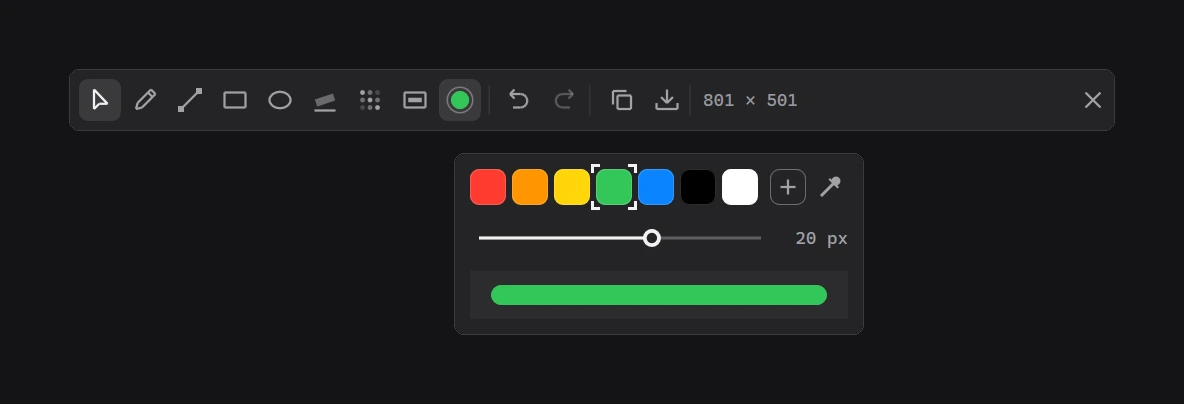
Colours: seven presets, any colour through the system dialog, or an eyedropper right from the capture. Width from 1 to 32 px, with a preview at its real size. The last colour and width are remembered. Undo/redo, moving and resizing what you drew: also there.
why it is so light
kadr is written in Rust and plain Win32: no Electron, no webview, no frameworks. On my laptop (2560×1600 at 150 %):
- idle: ~2 MB of memory and 0 % CPU; kadr just sleeps until you press the key;
- key to dimmed screen: ~60 ms;
- mouse release to editor: ~100 ms;
- the editor is its own process per capture: close it and all its memory goes back to the system.
For comparison: I tried a Tauri version of the settings window, and that prototype took ~210 MB and 7 processes. So everything is native.
vibe-coded
Most of the code was written not by me but by an AI (Claude); I set the tasks, tested and said what was wrong. Same idea as with entinyGram: if an AI does the work for me, everything should be open. So kadr is MIT, all the code is on GitHub.
not perfect yet
- The files are not code-signed yet, so Windows SmartScreen warns on first start: "More info" → "Run anyway". Every file has a SHA-256 next to it.
- Windows 11 likes to hand PrintScreen to Snipping Tool. kadr asks once whether to turn that off and changes the setting only after "yes". But on my own laptop bare PrintScreen still does not get through: a vendor Fn-key utility seems to take it. For now you can set another key in settings, e.g. Ctrl+PrintScreen.
- Not checked on several monitors, HDR or Windows 10.
get it
- download kadr 0.1.0: an installer without admin rights, or a portable exe
- the code on GitHub
If something breaks, tell me and I will fix it.